04 · Coding

Brand experience, built as a running digital system.

Public interfaces, prototype evidence and delivery structure show how each project is designed, built, validated and operated.

Live and prototype work are labelled separately. Nothing behind a login is inferred or reconstructed.

01

AII digital ecosystem

A multilingual brand site and independent operations platform that connect editorial content, services, appointments, enquiries and commerce-ready workflows.

Live production project

Scope
Brand site · operations platform · data services
Stack
Next.js · React · TypeScript · Cloudflare Workers · D1
Status
Live and designed for ongoing operations
Visit AII

Public Live Reel

Start with the real public interface.

REELScreen recording · 1440 × 900Awaiting file from owner

REEL · Public AII website

The public site, recorded end to end, is the first thing the case shows.

Interface evidence

One entry point, seen on two screens.

F01Desktop frame · 1440 × 900Awaiting file from owner

F01 · Public AII websiteDesktop entry

The public entry places brand navigation and language choice in one clear surface.

F02Phone frame · 390 × 844Awaiting file from owner

F02 · Public AII websiteMobile navigation

Responsive hierarchy keeps the primary route legible on a narrow screen.

F03Detail frame · 1440 × 810Awaiting file from owner

F03 · Public AII websiteBrand content

Editorial content is a managed public surface, not a static campaign page.

F04Detail frame · 1440 × 810Awaiting file from owner

F04 · Public AII websiteService route

Service discovery connects content reading to a defined action path.

System map

How the operational system is assembled

The public site and the back office are deployed as distinct surfaces. Public actions enter guarded service endpoints, while content, appointments, communications and commerce records are organised into separate data domains with explicit access boundaries.

  • Interface
  • Service
  • Data

01Interface · Visitor

Public brand site

Multilingual editorial, services, products, appointments and contact journeys.

Public submissions

02Service

Guarded service layer

Origin checks, captcha, request limits and rate controls protect public submissions.

Domain records

04Data

D1 data domains

Separate operational, content and commercial records, backed by migrations, audit trails and recovery paths.

03Interface · Operator

Independent back office

Role-gated dashboards and workflows for publishing, media, services, calendars, email, SEO and orders.

Migrations and audit trails

Delivery trace

Work completed, tied to something you can check.

01

Brand experience

Built reusable Next.js and TypeScript pages for the homepage, philosophy, services, shop, editorial, contact and legal journeys, with bilingual routing and responsive rules.

02

Operations back office

Designed a separate operational application for dashboard, publishing, media, services, calendar availability, bookings, email templates, SEO, orders and settings.

03

Business workflows

Connected public APIs with booking availability, contact and subscription capture, publishing, notifications, payments and order-related services.

04

Data and access

Planned database migrations, content and order models, role boundaries, audit records and recovery paths so daily operations remain traceable and controllable.

05

Release quality

Pending

Established checks for code, types, page structure and internationalisation, alongside preview/production governance and rollback verification.
Web Coding lead — front-end experience and back-end product delivery

Public evidence and operating systemThe frames document the public experience. The separate publishing, booking, commerce and audit workflows below are documented delivery structure, not claims about a public admin screen.

Frames 01-04 + system map

02

司南造物 · Three-surface Web System

A live digital service system for the 司南造物 brand, spanning a member experience, an employee workspace and an operations console for commerce, member relations and governance.

Live production project

Entrypoints
Member site · employee workspace · management console
Core domains
Commerce · members · operations · permissions
Status
Live three-sided web product
Visit member site

Public Live Reel

Start on the screen a member actually opens.

REELScreen recording · 1440 × 900Awaiting file from owner

REEL · Public member site

The recording stays on the public member surface and stops before a real verification request.

F01Phone frame · 390 × 844Awaiting file from owner

F01 · Public member siteMobile entry

The member path remains usable at touch scale.

Public sequence

Verification, action state and public browsing are one path.

  1. F02State frame · 1440 × 1080Awaiting file from owner

    F02 · Public member siteVerification entry

    A public member-facing entry provides a controlled first action.

  2. F03State frame · 1440 × 1080Awaiting file from owner

    F03 · Public member siteAction state

    The interface makes the next public action explicit.

  3. F04State frame · 1440 × 1080Awaiting file from owner

    F04 · Public member sitePublic browse path

    Browsing remains available without triggering a real verification request.

F05Detail frame · 1440 × 810Awaiting file from owner

F05 · Public member sitePublic interface detail

Caption pending: the owner has not yet named which public detail this frame carries.

System map

One business system, three role-specific surfaces

The system does not expose one generic admin interface to everyone. Each surface is organised around its user: members verify and access services, employees handle day-to-day work, and operators govern products, orders, membership and system rules.

  • Interface
  • Service
  • Data

01Interface · Member

Member surface

Brand content, bracelet verification, marketplace access and member services in a mobile-first flow.

Entity relationships

02Interface · Employee

Employee surface

A focused post-login workspace for lookup, entry, handling and operational collaboration.

Status transitions

03Interface · Operator

Management surface

Products, orders, members, points, staff, batches, tenants, risk, audit and configuration.

Validation and action feedback

04Data

Shared business state

Stable entity relationships, status transitions, validation and action feedback connect interfaces to services and data.

Delivery trace

Work completed, tied to something you can check.

01

Member experience

Translated the brand into an approachable browsing and member-service experience, with clear content hierarchy, action paths and mobile interaction rhythm.

02

Employee workspace

Organised post-login tasks around predictable feedback and real operating flows, reducing the learning cost of lookup, handling and collaboration work.

03

Management console

Implemented scalable information architecture and high-frequency management patterns for products, orders, members, points, employees and configuration.

04

Governance flows

Used lists, detail views, filters, batch actions, status labels and approval paths to make operational state, rules and exceptions actionable.

05

Data coordination

Mapped interfaces around members, goods, orders, points, staff, batches, tenants, risk records and audit logs to support stable service and database integration.

Web Coding — three-sided front-end delivery, operational flows and data coordination

Public evidence, private boundariesThese frames show only the public member surface. Employee and management functions below are a delivery-structure explanation based on project files; no logged-in view is represented here.

Frames 01-05 + system map

03

Artist Private Member Infrastructure

A high-fidelity four-surface product prototype connecting membership, official content, artist events, eligibility draws, external ticketing, on-site verification and exception handling.

High-fidelity prototype

Scope
4 surfaces · 726 page/state records
Stack
React 19 · TypeScript · Vite · Playwright
Status
High-fidelity prototype · not claimed as launched

Prototype overview

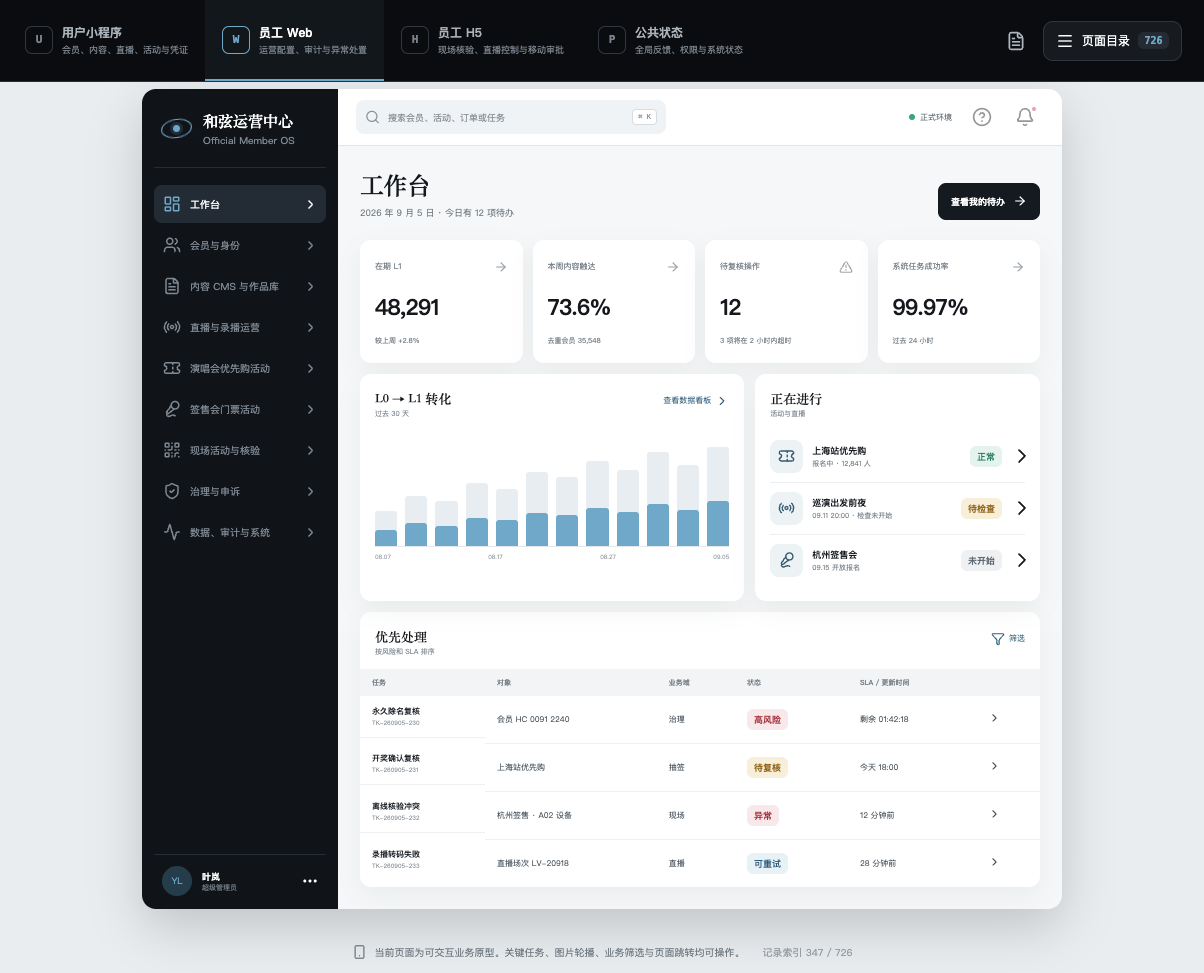
726 page and state records, organised as one navigable prototype

726 page and state records, organised as one navigable prototype

--StillPrototype overview

OVERVIEW · v3.2 local prototype

The catalogue count describes requirement and state coverage—not 726 individually art-directed screens.

Interface evidence

One entry point, seen on two screens.

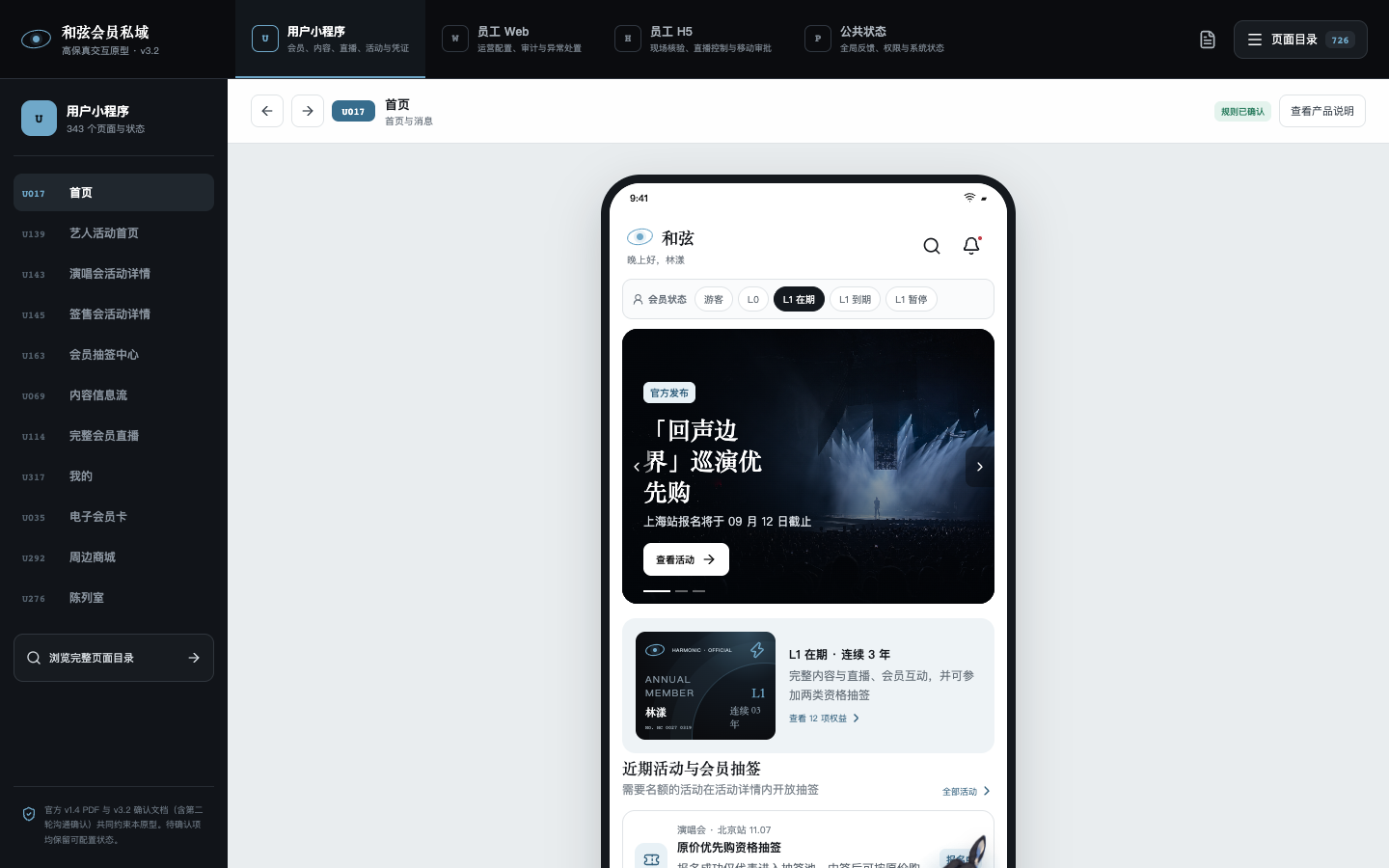
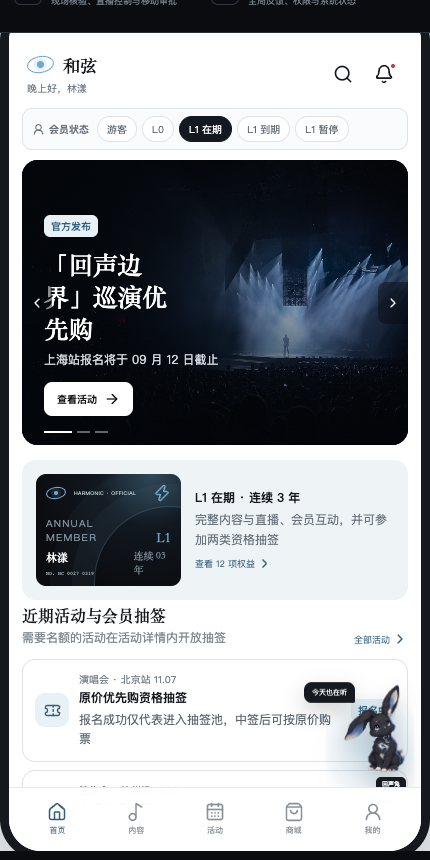
Member-aware home
F01 · User mini-program prototypeMember-aware home

Membership, official content, current events and draw status meet in one user entry without turning the draw into primary navigation.

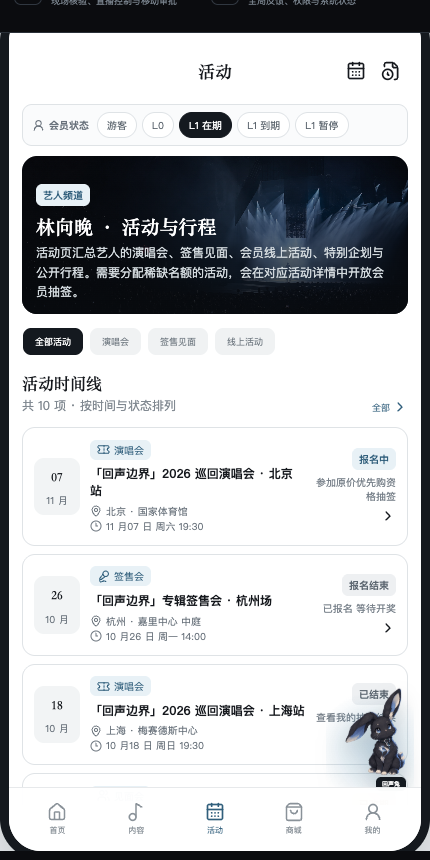
Artist activity timeline
F02 · User mini-program prototypeArtist activity timeline

Concerts, signings, online events and public schedules are separated from the content feed and organised by real participation state.

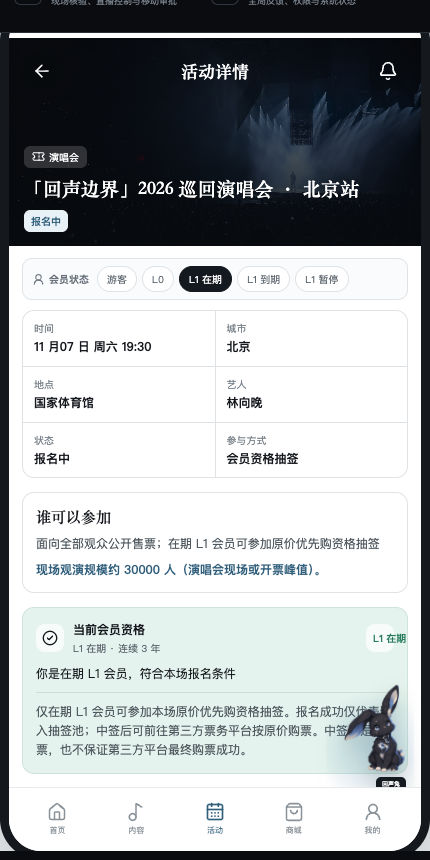
Eligibility before action
F03 · User mini-program prototypeEligibility before action

The event page states who may enter, what the draw grants and what it does not promise before presenting the next action.

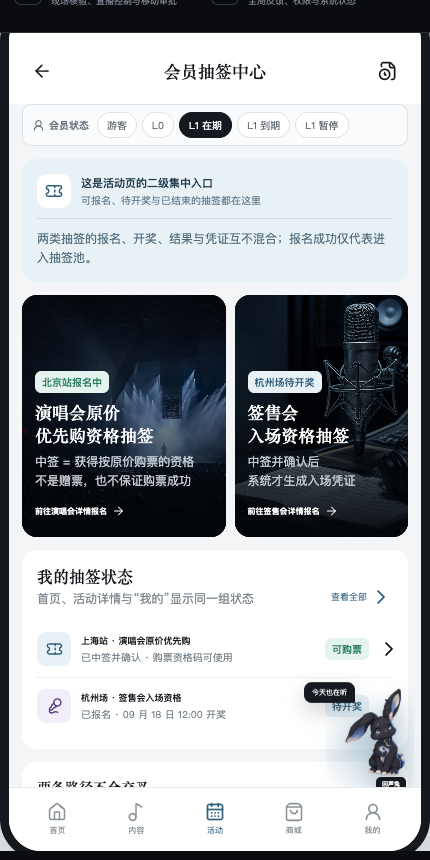
Two draws, one auditable capability
F04 · User mini-program prototypeTwo draws, one auditable capability

Priority-purchase and signing-entry draws keep their own events, outcomes and credentials while sharing eligibility and audit logic.

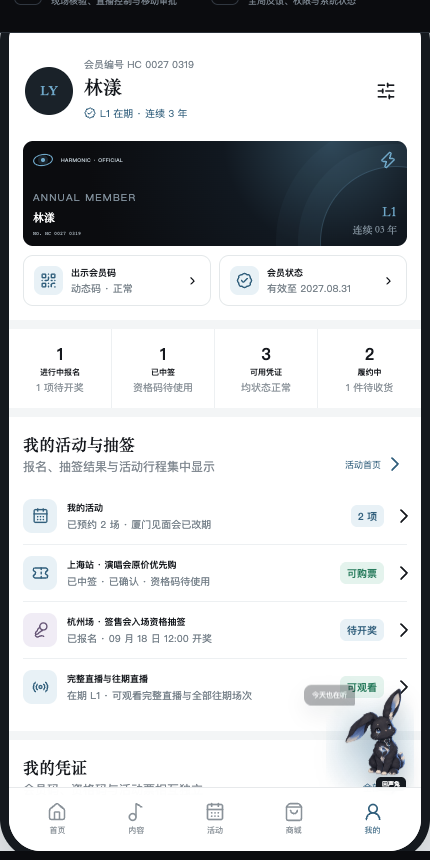
The account as a status console
F05 · User mini-program prototypeThe account as a status console

Membership, applications, draw results and three credential types remain visible with their own state and next step.

Operations and audit workspace
F06 · Employee Web prototypeOperations and audit workspace

The desktop surface turns member, event, content, draw and exception states into reviewable operational work.

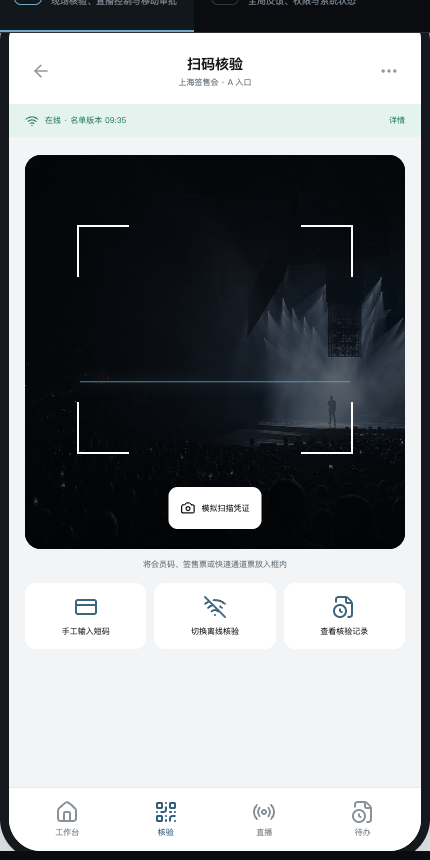
Weak-network verification entry
F07 · Employee H5 prototypeWeak-network verification entry

The H5 surface keeps the scanner, manual short code, offline mode and verification history within one shift workflow.

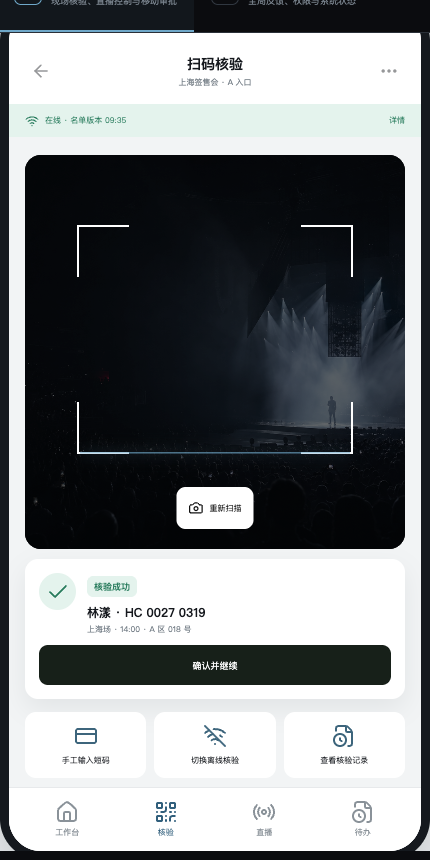
Immediate, auditable verification feedback
F08 · Employee H5 prototypeImmediate, auditable verification feedback

A successful scan names the person, event, zone and seat before the operator confirms and continues.

Case analysis

Turning complex rules into a system people can understand, operate and audit.

01

Challenge

Membership, content, events, ticketing and on-site work were easy to fragment. The highest risk was wording a membership benefit as a ticket promise.

DecisionTreat every promise as a state transition with an explicit boundary.

02

Product strategy

The user-facing line follows official content, artist activity and member interaction. Membership identity, two draw types, ticketing adapters and verification remain the operating foundation.

DecisionKeep the core journey ahead of merchandise, NFC collectibles and desktop pets.

03

Information architecture

Home, Content, Activities, Shop and Me form the five primary destinations. Draws appear inside relevant event details, the home highlight and account records.

DecisionActivities are primary; a draw is a member action inside an activity.

04

State model

Visitor, L0, active L1, expired and suspended membership states combine with registration, result, confirmation, expiry, invalidation, repeat-scan and appeal states.

DecisionOnly active L1 may enter both core draws; spending and interaction never increase draw weight.

05

Iteration

The second review moved draws out of primary navigation, separated activity cards from content cards and rewrote eligibility and outcome copy.

DecisionA successful application means entry into a pool—not a win; a concert win is purchase eligibility, not a free ticket.

06

Outcome and learning

The v3.2 catalogue covers 726 page and state records: 343 user, 304 employee Web, 54 employee H5 and 25 public-state records.

DecisionDescribe coverage precisely; do not inflate the catalogue into 726 individually designed screens.

System map

Four surfaces, one credential and state language

The member surface, operating workspace, on-site H5 and public status pages do different jobs, but they resolve against the same eligibility, event, credential and audit records.

  • Interface
  • Service
  • Data

01Interface · Member

User mini-program

Official content, artist activities, membership status, draw actions, credentials and account records.

Member action

02Service

Eligibility and credential rules

Separates membership, application, result, purchase eligibility, entry credential and verification.

State and credential records

04Data

Shared audit ledger

Event, membership, draw, credential, scan, exception and recovery records remain traceable across surfaces.

03Interface · Staff

Web, H5 and public feedback

Operations, review, offline verification, conflict handling and recoverable public exceptions.

Verification and audit feedback

Delivery trace

Work completed, tied to something you can check.

01

Rule clarification

F03F04

Separated active membership, draw entry, draw result, external purchase eligibility and signing-entry credential into distinct promises and states.

02

Information architecture

F01F02

Established five primary destinations and returned draw actions to the events and account records that give them meaning.

03

Multi-surface state system

Aligned user, operator, on-site and public feedback around shared eligibility, credential and audit language.

04

High-fidelity prototype

OVERVIEWF05F06

Built a React and TypeScript prototype that makes representative pages, member states, transitions and exception recovery directly reviewable.

05

On-site verification

F07F08

Designed scan, short-code, offline and duplicate-verification handling for peak on-site work without conflating it with livestream capacity.

Role, project dates and team boundary pending owner confirmation

Prototype evidence and publication boundaryAll frames were recaptured from the current v3.2 source. The work is presented as a high-fidelity prototype and document set; launch status, client identity and public-display permission remain unclaimed.

OVERVIEW + F01-F08 + product source documents